> For the complete documentation index, see [llms.txt](https://badland-batteries.gitbook.io/b/llms.txt). Markdown versions of documentation pages are available by appending `.md` to page URLs; this page is available as [Markdown](https://badland-batteries.gitbook.io/b/12s-17000mah-15c-user-manual/led-indicators.md).
# LED Indicators
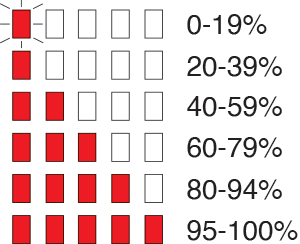
**State of Charge**\
Occurs on button push if there are no errors.
***
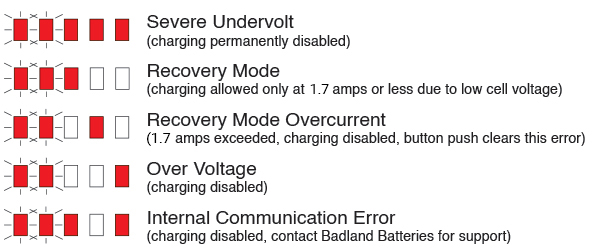
**Error Indication**\
Occurs on button push if an error is present. If multiple errors are present, only the most severe error is shown.
***
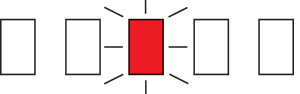
**Battery Temperature Fault**\
Flashing LED indicates battery can discharge but can’t charge. Solid LED indicates battery can’t charge and should not be discharged.
***
**Firmware Update in Progress**\
Pattern occurs when a firmware update is active. If firmware update indicator is continuously active, contact Badland Batteries for support. NEVER charge, discharge or use the battery while the firmware update indicator is displayed.
***
**Storage Mode Active Indicator**\
While the battery is discharging to storage voltage to improve battery life, the state of charge LEDs will repeatedly flash towards low state of charge.
***
**Postpone Storage Mode**\
Hold down the button until the five main LEDs flash twice. This postpones storage mode from happening and stops storage mode if it’s active.